Video assessment: see the skill, record the decision.
Video assessment means reviewing a recording of someone doing a real task against clear criteria. Candidates record on their phone or upload a video. Assessors review it against your checklist, add timestamped feedback, and the decision is kept with the evidence behind it.
For RTOs, trainers and assessors, workplace training and compliance teams, and anyone who needs to judge practical skills they can't watch in person.
Updated
- Record anywhereCandidates film the task in the browser or the free iOS and Android app, or upload a video they already have.
- Review against criteriaAssessors work through your checklist or rubric and pin comments to exact moments in the video.
- Keep a decision recordEvidence, criteria, comments, consent and the outcome stay together, with xAPI records if you need them.
Video assessment already running in real organisations
Usage from organisations assessing practical skills on video with Remote Reviewer.
- Reviews completed
- 2,000+
- xAPI statements recorded
- 50,000+
- Organisations
- 45+
- Learning Record Stores connected
- 85+
What is video assessment?
Video assessment is a method of judging practical skills from a recording. The person being assessed films themselves doing a real task, and a qualified reviewer watches the video later and records an outcome against set criteria, such as a checklist, rubric, or unit of competency.
A written test shows what someone knows. A video shows what they can do: how they handle equipment, follow a procedure, speak with a customer, or work safely. Because the recording can be paused, replayed, and shared with a second reviewer, the assessor no longer has to catch everything live.
Key points
- It's usually asynchronous. The candidate records when the task happens; the assessor reviews when they're free. No one has to travel or line up calendars.
- The criteria matter more than the camera. A video is only assessable if the candidate knows what to show and the reviewer knows what to look for.
- It is different from a video upload. Structured video assessment ties the recording to a task, criteria, comments, and an outcome. A file in a shared drive does none of that.
- People make the decision. Software organises the evidence and the review. A trained assessor still judges whether the performance meets the standard.
-
Less travel, more coverage
Assess candidates across sites, regions, and shifts without sending an assessor to every attempt.
-
More consistent decisions
Every reviewer works from the same criteria and can watch the same evidence, which makes moderation and second opinions straightforward.
-
Evidence you can revisit
If a decision is questioned months later, the recording, the comments, and the outcome are still there to show how it was made.
How video assessment works, step by step
A video assessment in Remote Reviewer follows five steps. Candidates only see the parts they need, and reviewers get one place to watch, assess, and decide.
-
Define the task
Write what the candidate must demonstrate, the conditions, and the checklist or rubric the reviewer will use. Map it to a unit of competency if you need to.
-
Send it to the candidate
The candidate gets a link or opens it in the app or your LMS. A consent and self-identification prompt can appear before recording starts.
-
Record or upload the video
They film the task on a phone, tablet, or laptop, or upload an existing recording such as a simulator or VR capture.
-
Review against the criteria
The assessor watches the video, marks each criterion, and adds comments tied to the exact second they refer to. Other reviewers can be added for moderation.
-
Record the outcome
The decision is saved with the evidence and feedback, returned to the candidate, and can be sent as xAPI to a Learning Record Store or as a grade to your LMS.
Video assessment from the candidate's phone
Most practical tasks happen away from a desk. The free Remote Reviewer app lets candidates sign in, see their tasks, give consent, record or upload their video, and read the assessor's timestamped feedback, all from their phone.
-
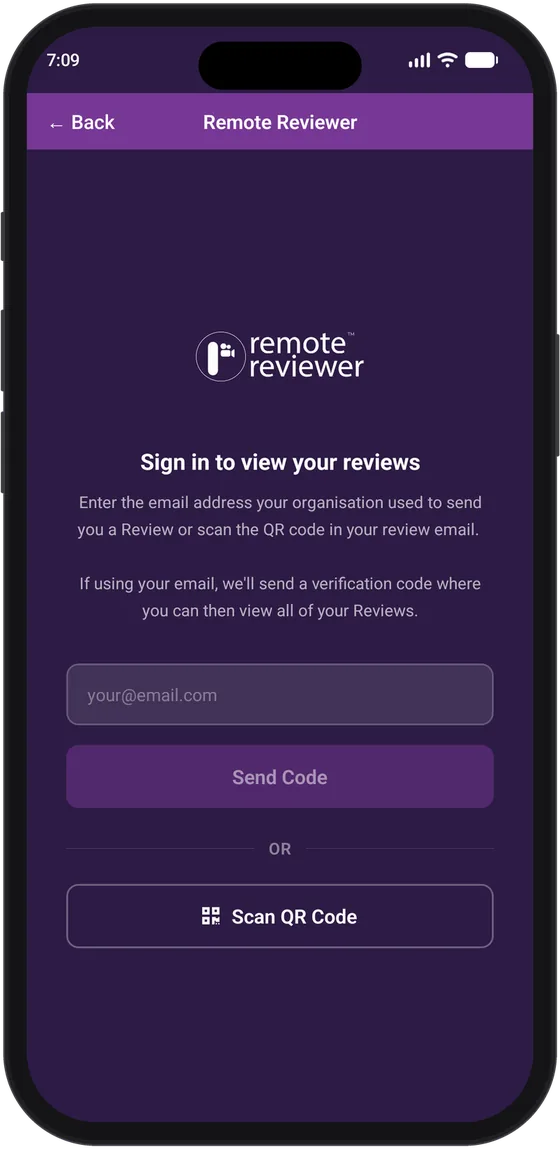 Sign inWith email or a QR code
-
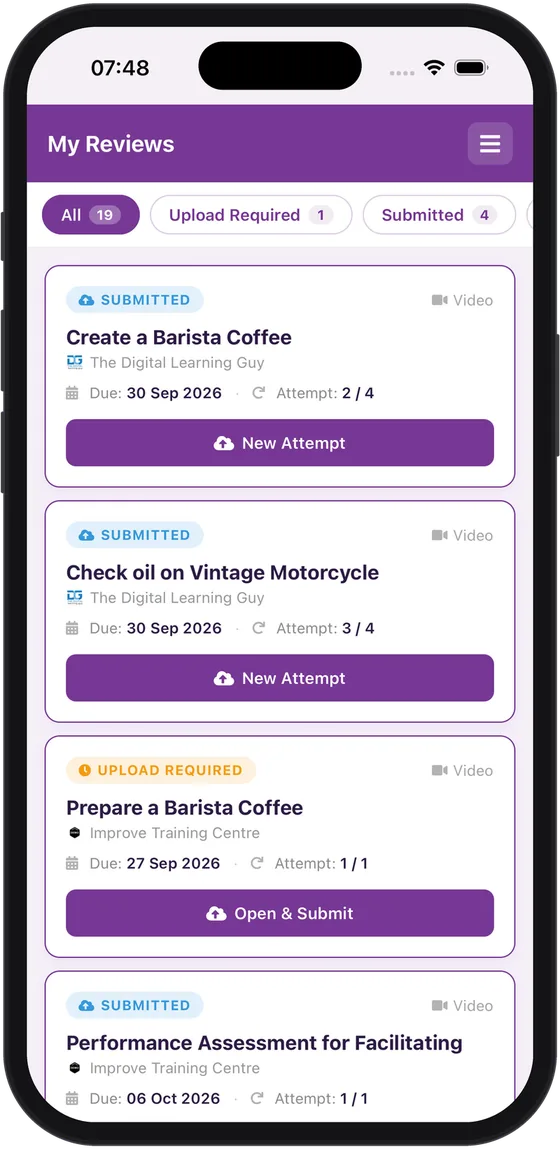 See their tasksEvery assessment in one list
-
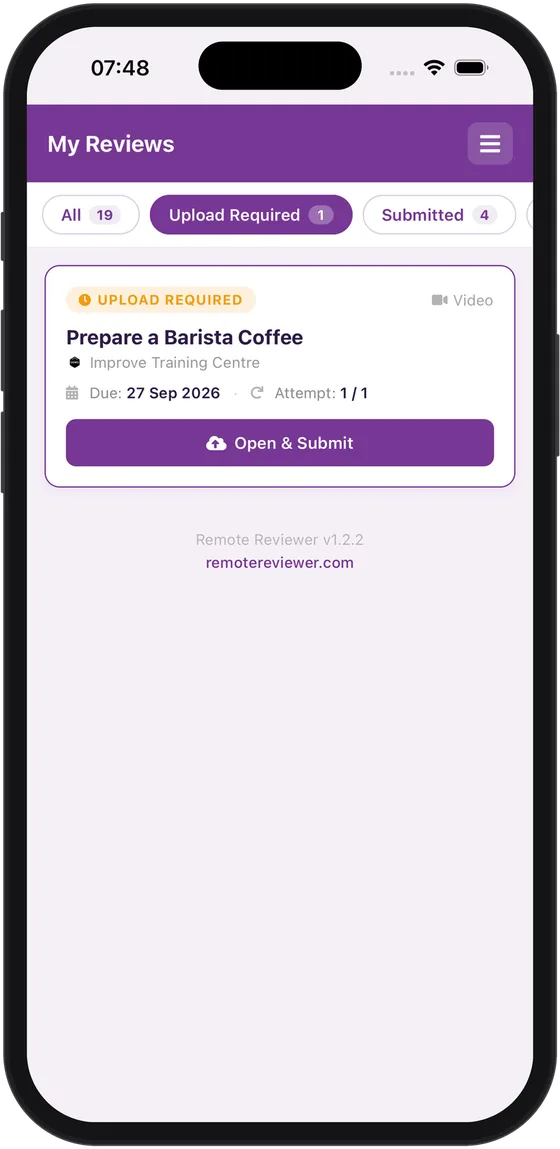 Know what's dueFilter to tasks needing a video
-
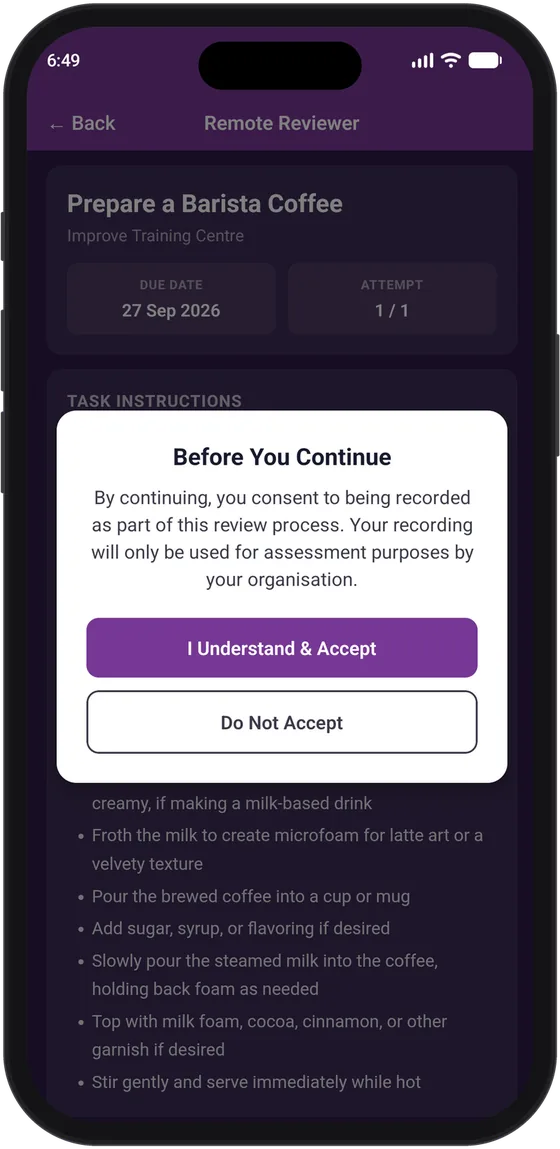 Give consentIn your organisation's wording
-
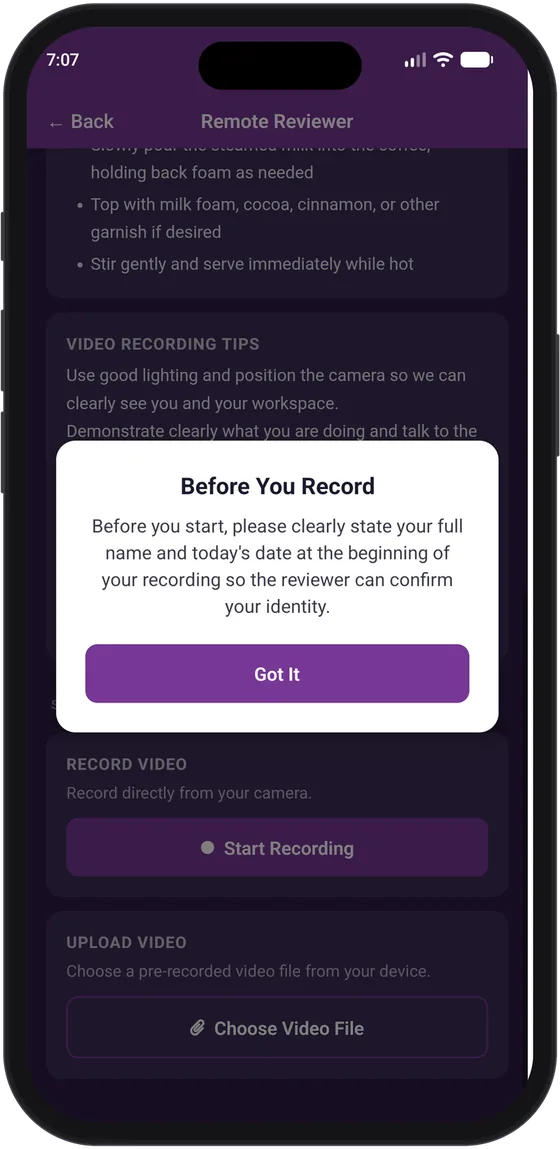 Identify themselvesName and date on camera
-
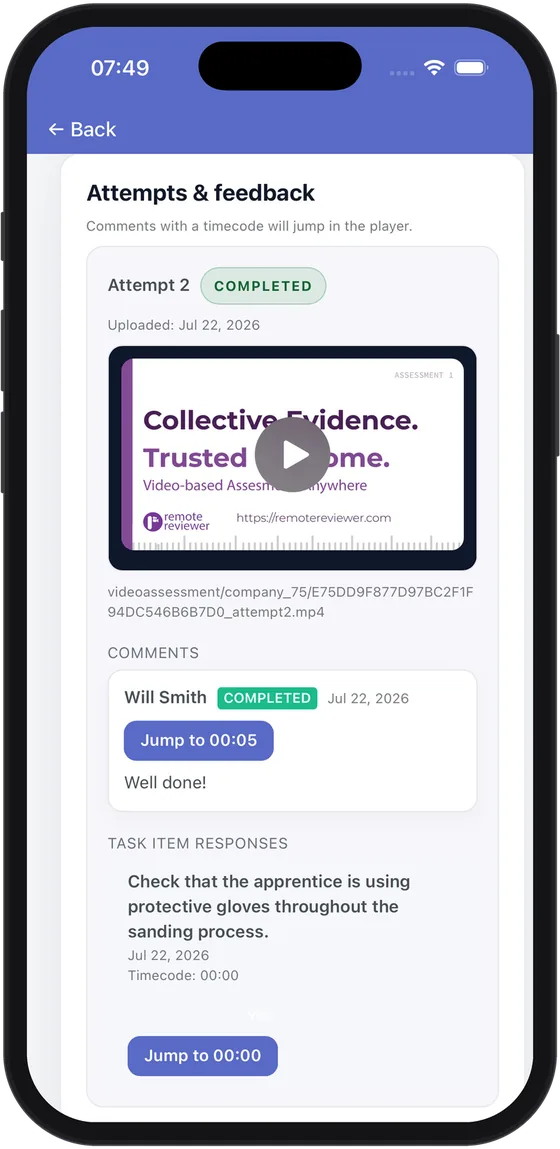 Read the feedbackComments jump to the moment
What you need from video assessment software
Recording a video is easy. Turning it into an assessment decision you can stand behind takes structure. These are the capabilities Remote Reviewer provides for that.
-
Capture in the browser or app
Candidates record directly or upload a file. The free companion app for iOS and Android lets them sign in, record, and see feedback from their phone.
-
Checklists and rubrics
Assess every submission against the same observation checklist or rubric, so outcomes don't depend on who happened to review the video.
-
Timestamped comments
Feedback is pinned to the moment in the video it refers to. Candidates can jump straight to it, and moderators can see exactly what the assessor saw.
-
Multiple reviewers and moderation
Assign more than one reviewer to the same evidence for second opinions, moderation, or validation, with every decision recorded against the person who made it.
-
Consent and self-identification
Prompt candidates for consent in your own words before they record. Each accept or decline is stored with the time, device, and wording shown.
-
ReviewAI assistance
On selected plans, ReviewAI points reviewers to likely relevant moments and checks submissions against your requirements. The reviewer always makes the final call.
-
LMS integration (LTI 1.3)
Run video assessments inside Moodle and other LTI 1.3 platforms. Learners record in the course and pass or fail results flow back to the gradebook. Available on plans with API access.
-
xAPI and Learning Record Stores
Store assessment outcomes as portable xAPI statements in your own Learning Record Store or a provided one, so records aren't locked inside a single tool.
-
Storage and privacy options
On selected plans, keep video in your own Amazon S3, Google Drive, OneDrive, or Dropbox storage, upload in bulk, and blur faces in recordings.
Structured video assessment vs video uploads vs live observation
Most teams already collect some video, usually through an LMS assignment, a shared drive, or email. The difference with structured video assessment is that the recording, the criteria, the feedback, and the decision are connected.
| Factor | Structured video assessment | Video upload (LMS assignment, drive, email) | Live observation |
|---|---|---|---|
| Candidate knows what to show | Yes, task and criteria are set out up front | Often just "upload your video" | Yes, briefed on the day |
| Assessor must be there | No | No | Yes |
| Reviewed against shared criteria | Yes, built into the review | Only if the reviewer applies them manually | Depends on the assessor |
| Feedback tied to the moment | Yes, timestamped comments | General comments, often separate | Verbal, rarely written down |
| Can be replayed and moderated | Yes, with every reviewer's decision recorded | Only if the file is kept | No, unless separately filmed |
| Consent recorded | Yes, with time, device, and wording | Rarely | On paper, if at all |
| Decision record | Evidence, criteria, comments, and outcome together, with optional xAPI | Grade without the reasoning | Assessor's notes |
How to record video evidence that can actually be assessed
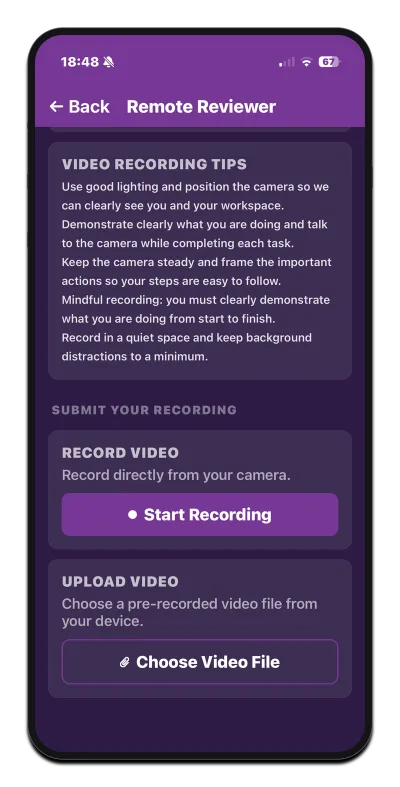
Most rejected videos fail for simple reasons: the key step is out of frame, the audio is lost, or the reviewer can't tell who is in the shot. Share these points with candidates before they record.
- Read the criteria first. Know exactly which steps the reviewer needs to see, and plan to show each one clearly.
- Frame the whole task. Keep hands, tools, and the work in shot. If detail matters, move closer for that step and say what you're doing.
- Get the sound right. Reduce background noise and talk through decisions if communication or reasoning is being assessed.
- Identify yourself. Follow your organisation's process, such as stating your name at the start or showing your face, so the evidence is authentic.
- Record in one take where you can. A continuous recording is easier to trust than a set of edited clips. Check whether separate clips are allowed if the task is long.
- Stay safe and in context. Record in the real or simulated workplace, follow site safety rules, and get permission before filming other people.
Where video assessment works well
Video assessment suits any skill a reviewer can judge by watching it. These are examples of how organisations use Remote Reviewer today.
-
Trade and construction skills
Apprentices and trainees film practical site and workshop tasks for review, without an assessor attending every attempt.
View use case -
Workplace safety and risk
Record safety-critical procedures and risk checks so supervisors can confirm they were done correctly.
View use case -
Childcare and community services
Capture scenarios and observed interactions as evidence for placement and workplace assessment.
View use case -
Hospitality skills
Assess barista and service skills from a recording of a real shift, against a consistent checklist.
View use case -
Simulation and VR procedures
Upload flight simulator or VR medical procedure recordings and review them step by step.
View use case -
Language and speaking
Review ESL speaking tasks against communication criteria, with feedback timed to each response.
View use case -
Presentations and interviews
Give structured feedback on presentations and mock interviews covering delivery, clarity, and confidence.
View use case -
More video assessment examples
See every use case, including aviation pre-flight checks, remote skills assessment, and flight simulation review.
See all use cases
Video evidence and the rules of evidence
For Australian RTOs, video is a practical way to capture observable performance where the task and the training package allow it, particularly for workplace-based and remote learners.
Under the 2025 Standards for RTOs, which took effect on 1 July 2025, the focus is on demonstrated practice and outcomes. Structured video assessment helps show how each decision was reached: the task, the criteria mapped to the unit of competency, what the assessor saw, and when.
- Valid: the observation checklist reflects the performance criteria you need to see.
- Sufficient: reviewers can request more evidence when a recording doesn't show enough.
- Authentic: consent and self-identification prompts are recorded with the submission.
- Current: every recording is dated, so you know when the performance happened.
Your RTO stays responsible for assessment design, assessor judgement, and validation. Remote Reviewer works alongside your student management system and LMS rather than replacing them.
The platform behind video assessment
This site explains video assessment. Remote Reviewer is the Australian-built platform that runs it: video capture, structured review, timestamped feedback, consent records, and xAPI-backed results.
You can start on the free plan to try the full workflow with a small group, then move to a paid plan for more reviews, templates, ReviewAI, LMS integration, and storage options.
-

Award-winning platform. Remote Reviewer won Gold for Best EdTech Innovation at LearnX 2024.
-

Strategic Partner of ILP Asia Pacific. Remote Reviewer supports the Institute for Learning & Performance, a 3,000+ member L&D community across Australia, New Zealand, and Singapore. View partnership
Video assessment terms, defined
Plain-language definitions of the terms you'll meet when setting up video assessment.
- Video assessment
- Judging a person's practical skills by reviewing a recording of them performing a real task against defined criteria.
- Asynchronous video assessment
- Video assessment where the candidate records and the reviewer assesses at different times, so neither has to be available at once.
- Timestamped feedback
- Reviewer comments linked to a specific moment in the video, so the candidate and any moderator can see exactly what was observed.
- Observation checklist
- A structured list of steps or behaviours a reviewer looks for when watching recorded evidence of a task.
- Rubric
- A set of criteria with performance levels, used to assess evidence consistently across candidates and reviewers.
- Moderation
- A quality process in which reviewers cross-check assessment decisions to confirm they are consistent and applied to the same standard.
- Rules of evidence
- The principle that assessment evidence should be valid, sufficient, authentic, and current.
- Unit of competency
- A nationally recognised specification of the skills and knowledge needed to perform a task, used as the standard assessment criteria are mapped to.
- Consent record
- A stored record of a candidate's agreement to be recorded, including the time, device, and the exact wording they were shown.
- xAPI
- The Experience API, an open standard for recording learning and assessment activity as portable statements that can be shared across systems.
- Learning Record Store (LRS)
- A data store that receives, stores, and returns xAPI statements, giving an organisation a durable record of assessment outcomes.
- LTI 1.3
- A standard that lets a learning tool, such as a video assessment platform, run inside an LMS like Moodle and return grades to it.
Video assessment questions, answered
What trainers, assessors, and compliance teams usually ask before moving practical assessment to video.
Video assessment is a way of judging practical skills from a recording. The person being assessed films themselves doing a real task, and a qualified reviewer watches the video and records an outcome against set criteria, such as a checklist, rubric, or unit of competency.
Video assessment software manages the whole process: it sends the task to the candidate, captures or receives the video, gives reviewers the criteria to assess against, stores timestamped feedback, and keeps the decision with the evidence. Remote Reviewer is video assessment software built for practical skills.
You define the task and the criteria, send it to the candidate, and they record or upload a video. A reviewer watches it, marks each criterion, adds timestamped comments, and records the outcome. The result goes back to the candidate and can be sent to a Learning Record Store or an LMS gradebook.
Any skill a reviewer can judge by watching it. Common examples include trade and construction tasks, workplace safety procedures, hospitality service, childcare interactions, presentations, mock interviews, language speaking tasks, and simulator or VR procedures.
It can be more consistent, because every reviewer assesses against the same criteria and can replay the same evidence. It depends on good task design: candidates need to know what to show, and reviewers need to be able to request more evidence when a recording doesn't show enough.
Remote Reviewer can prompt candidates for consent and self-identification before they record, and stores each response with the time, device, and wording shown. Many organisations also ask candidates to state their name or show their face at the start of the recording.
Yes, where video suits the task and the training package requirements. Structured video assessment helps show that evidence is valid, sufficient, authentic, and current, and supports the 2025 Standards for RTOs' focus on demonstrated practice. The RTO stays responsible for assessment design, assessor judgement, and validation. Read the RTO guide.
A phone, tablet, or computer with a camera. Candidates can record in the browser, use the free Remote Reviewer companion app for iOS and Android, or upload a video they have already recorded. About the app.
Yes. You can assign several reviewers to the same evidence for second opinions, moderation, or validation, and each decision is recorded against the reviewer who made it.
No. ReviewAI, available on selected plans, assists reviewers by pointing them to likely relevant moments and checking submissions against your requirements. A person always makes the final assessment decision.
Yes. Remote Reviewer connects to Moodle and other LMSs using the LTI 1.3 standard. Learners record or upload video inside the course, and pass or fail results flow back to the gradebook. LMS integration is available on plans with API access. See how LMS integration works.
xAPI is an open standard for recording learning and assessment activity as portable statements. A Learning Record Store (LRS) receives and stores those statements. Remote Reviewer can send video assessment outcomes to your own LRS or a provided one.
Remote Reviewer has a free plan that covers the full video assessment workflow for a small number of tasks and reviewers. Paid plans add more reviews, longer recordings, ReviewAI, LMS integration, and storage options. Current pricing is on the Remote Reviewer website. View plans.
Choose one practical task, write the checklist a reviewer would use, and create a free Remote Reviewer account. Send the task to a few candidates, review their videos, and refine the instructions before rolling it out more widely.
Run your first video assessment this week
Pick one practical task, write the checklist, and send it to a few candidates. The free Remote Reviewer plan covers the whole workflow, from recording to decision.